

Utilized across industries, Docker is an open-source platform designed for developing, delivering, and running applications within containers. Before delving deeper into this topic, here are some intriguing facts about Docker technology:
- Named after the portmanteau 'dock' and 'container,' Docker simplifies container management and portability.
- Docker is renowned for its open-source nature, fostering collaboration and innovation.
- Seamless integration with a multitude of tools and technologies underscores Docker's versatility.
- Widely adopted across various sectors, including IT and software development, Docker has become a staple in modern application deployment.
With this brief overview of Docker, let's now explore Docker Containers and Docker Images.
What Are Docker Containers?
From the very beginning of Docker, it is important to understand the main item of the Docker service, which is Docker containers.
The Docker container can be viewed as a virtual machine that has much fewer resources than physical virtual machines and that runs our application on our host system. The Docker container uses hardware from the computer/server on which the Docker container itself is running. We can explain that, for example, we have two Docker containers for frontend and backend that are isolated from each other, and this makes it much easier to transfer applications from one environment to another.
Some of the main features of Docker containers are:
- Standardized software units
- Isolated environments
- Portability Scalability on demand
- Resource efficiency
What Are Docker Images?
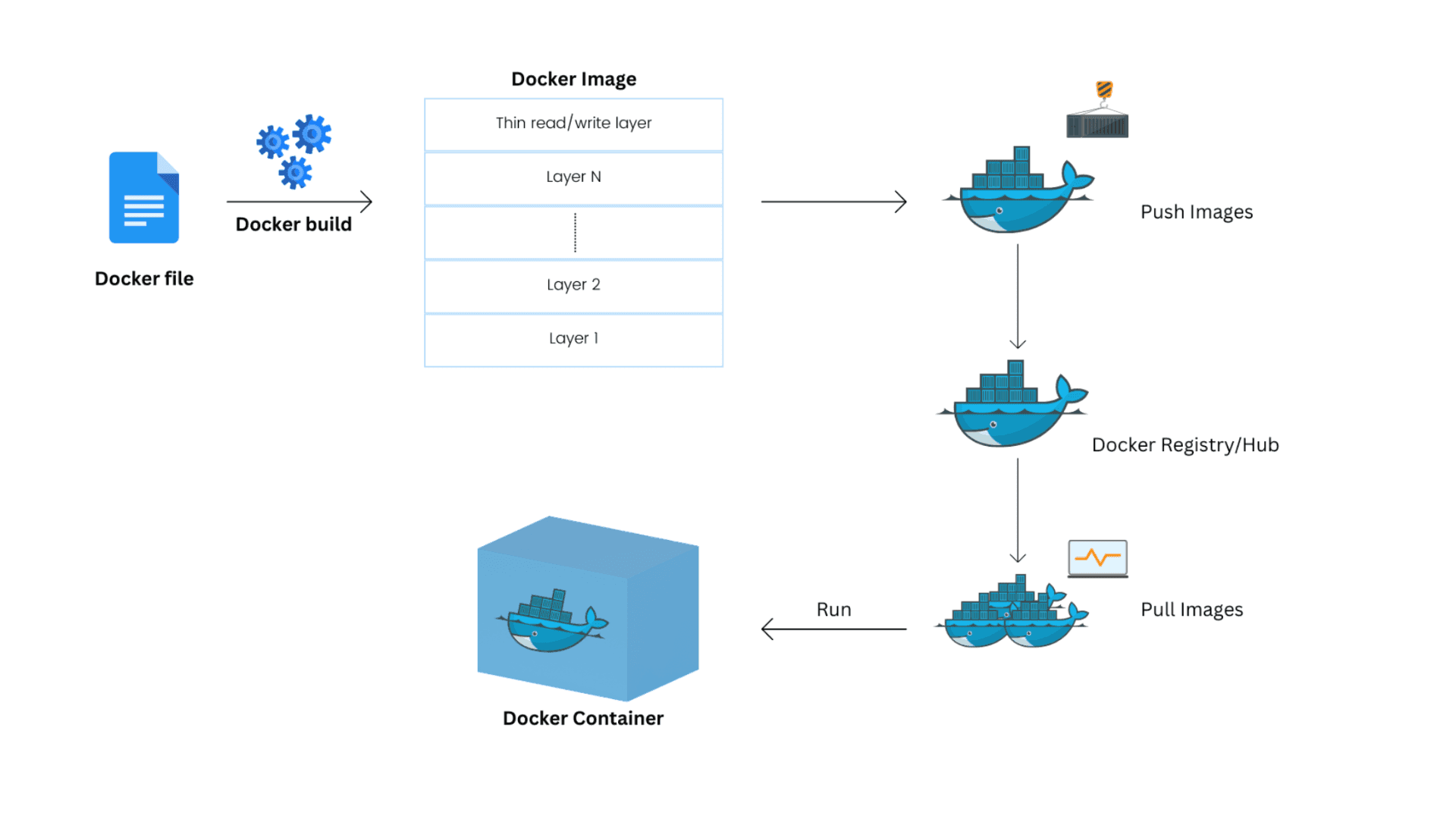
Docker images are an integral part of the Docker container that contains all the necessary information, code, libraries, dependencies, and settings for creating and running the Docker container itself. Docker image represents a static version of a software application ready to run inside a Docker container.
Here are some key concepts related to Docker images:
- OS Base - Refers specifically to the operating system of our Docker image.
- Dependencies - Docker images can contain the required libraries, code, and tools required for a particular application.
- Configuration - Configuration files such as network settings, variables, and other settings.
- Layers - Docker images consist of a series of layers, with each layer adding to or modifying the content of the image. This enables efficient sharing of resources between different images and enables fast and efficient operations.
- Naming and Versioning - Each created Docker image is versioned, for example, image-name:version1 (and this is otherwise the tag for each Docker image).
Best Practices
Now, we will talk about some of the most common best practices used to build and secure our Docker application
Docker image's best practices
Always prefer minimal base images. The choice for the minimal basis of the Docker image contributes the most to improving the performance of your Docker container, it refers to the optimization of the size in MB/GB of your Docker image, from which the Docker container is later built. This is generally the practice to apply wherever possible, and we will give one example here:
Wrong practice
FROM ubuntu:latest COPY . /app WORKDIR /app CMD ["python", "app.py"]
Correct practice
FROM python:3.9-alpine COPY . /app WORKDIR /app CMD ["python", "app.py"]
In this example, we can see a Docker image that uses the latest version and an example of a second image that uses a specific version, in this case, "3.9", built on the Alpine Linux distribution. Some of the main reasons why this practice is important:
- Predictability - If we use specific versions, we can "predict" the construction process, if we use the "latest" version, the Docker image can be updated and usually those versions are not safe.
- Stability - Specific versions of already built Docker images are generally always tested and generally stable.
- Performance - If we use a specific version of an already built Docker image, we can optimize various needs for the operation of our application or environment, while the latest version has functions/libraries that we do not need.
Practice for Dockerfile
As we have already mentioned, a Dockerfile is a text file used to build a Docker image. There are a lot of them and you can always work on improving the Dockerfile. Here we will go through just a few items that are mainly used to build a better Docker image.
Use the least privileged user
In this example, in our Dockerfile, we let it be known that our Docker image used during the construction and later use of the Docker container has the privileges of OUR created system user, which means that we do not use the "root" user, more precisely, we do not have full permissions and privileges. We can add certain privileges to our created user, which is not the default, and this greatly contributes to the security and vulnerability of our Docker container.
FROM node:18-alpine USER node
Reduce the number of layers in the Dockerfile
When the Docker image is built, it uses steps that we can consider as layers, which are the minified lines of execution that we added in our Dockerfile. In this example, we specify which packages we want to add to our Docker image, and as we can see we have one Layer that is marked with "RUN" and we are assigned 3 commands that will be executed as one. We could do this with 3 "RUN" commands and then we would have 3 layers. It is important here that the more layers we have, the longer the construction of the Docker image will take and the more Docker images will be occupied, with the fact that we have reduced everything here to one layer at the end.
FROM ubuntu:23.10 RUN apt-get update && \ apt-get install -y some-package && \ rm -rf /var/lib/apt/lists/*
Use .dockerignore
When using the "docker build" command the Docker engine files and directories we specified in .dockerignore will be skipped. This practice is useful to reduce the size of the Docker image and speed up the build process, avoiding the inclusion of unnecessary or temporary files, such as configuration files for the development environment.
node_modules .git .env
Multistage Docker images
As the title itself says, here we will talk about Multistage Docker images. The main purpose of multistage Docker images is to reduce the final size of Docker images and remove unnecessary components that are only needed to build the application but are not needed in production. There are two types of mu docker images:
Non-multistage - This is a classic example of building a Docker image, it uses only one build phase. This is recommended for smaller projects because they are simple, and this way of building a Docker image is generally avoided.
FROM node:14-alpine WORKDIR /app COPY package*.json ./ RUN npm install COPY . . RUN npm run build RUN npm install --production USER node CMD ["npm", "start"]
Multistage - A very well-known practice nowadays, with multistage construction of Docker images we have several phases, each phase is separate and contains its own task, it allows separation of different phases of application construction, which can lead to smaller images and improved security. This approach is a bit more complex than other methods.
FROM node:14-alpine AS build WORKDIR /app COPY package*.json ./ RUN npm install COPY . . RUN npm run build FROM node:14-alpine AS production WORKDIR /app COPY package*.json ./ RUN npm install --production COPY --from=build /app/dist ./dist USER node CMD ["npm", "start"]
In this example of ours, we have two phases in which we use the Node application.
- In the first phase (as build) - We copy the package.json file and run the command that will only build our node application, but not run it.
- In the second phase (as production)- We copy the dist files from the first phase (build) and use this phase exclusively only to run our node application.
Security
We all know how important security is for applications, especially production ones, so here we will talk about only some important items related to how to improve security when working with Docker.
Docker Socket
The most important thing when working with Docker is that the Docker socket is isolated and secure. Because we can remotely connect to the Docker engine and access containers and manage our entire environment and platform. But sometimes it is important to be able to access, in this example we can see that the range IP is open public “0.0.0.0” and the port on which the Docker socket is “2376”. Also, if we must have publicly open access, as we can see, it is always recommended to use a type of encryption, such as TLS certificates.
{ "hosts": ["unix:///var/run/docker.sock", "tcp://0.0.0.0:2376"], "tlsverify": true, "tlscacert": "/path/to/ca.pem", "tlscert": "/path/to/server-cert.pem", "tlskey": "/path/to/server-key.pem" }
Verified Docker Images
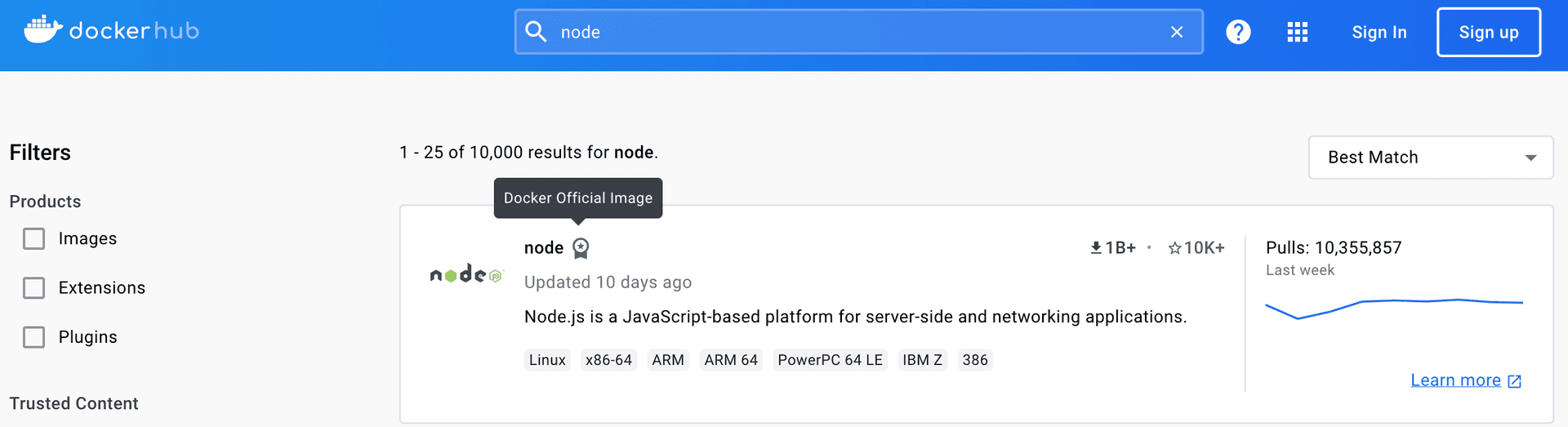
Before you use the already built Docker image for your application, which you will later modify according to your needs, such as node application, always make sure your Docker image is verified by Docker Hub. This greatly contributes to the very security and vulnerability of your future application. We can see that in the example below:
Scanning Docker Images
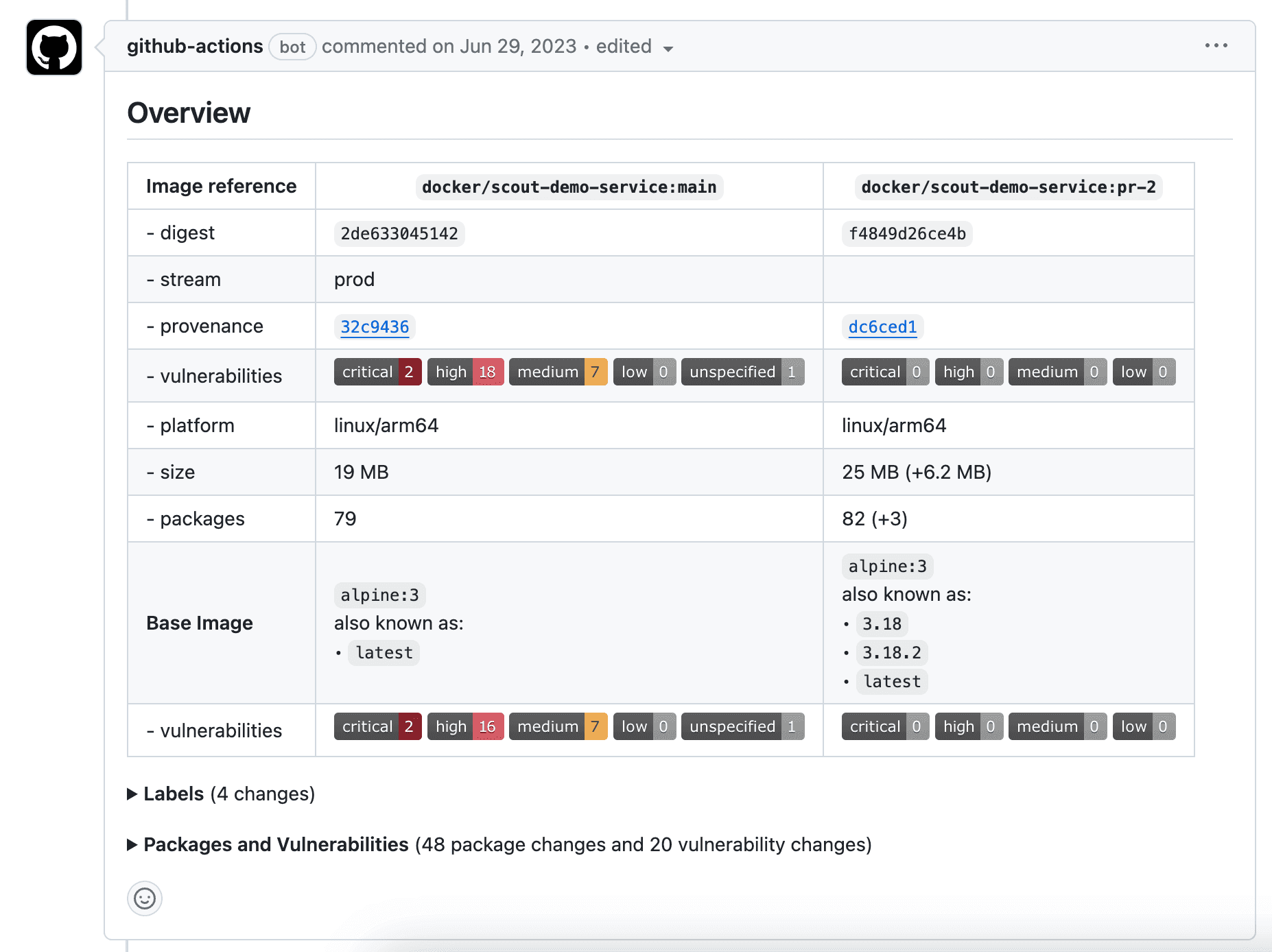
Docker recently released their official tool called "Docker Scout" which can be used to scan your Docker image for vulnerabilities. By this, you can see if your picture, for example, uses some vulnerable package and modify it. This is a good tool because you can add it to your GitHub action that will build your Docker image, and warn if there is a problem with your Docker image so that it is not sent further to your production environment. Also a very important and useful thing regarding security. This is an example of what the summary looks like after using docker scout on a Docker image:
To Sum Up
Finally, we can note that we have a lot of good practices and tools that we can use for improvement and security in working with Docker and with our Docker applications. We have gone through only some of the most common ones in this blog. More information about this topic you can find here. I hope this article helped you see you on our blog with the next topic.