

One of the most unusual mistakes in the history of software deployment occurred in NASA. In 1999, NASA launched a spacecraft for investigations of Mars’ atmosphere. Unfortunately, the spacecraft was lost in space. An investigation indicated that the failure resulted from a navigational error due to commands from Earth being sent in English units (in this case, pound-seconds) without being converted into the metric standard (Newton-seconds). This unlikely situation highlights the importance of additional testing and verification of all aspects of the implementation software. (More about this story: Mission - Mars Climate Orbited). In this blog you will learn what deployment is and what are the most commonly used deployment strategies.
What is deployment?
Deployment is the process of transferring a software application from a development environment to an actual working environment that is available to users or other software. It represents the deployment of the application on the target platform, such as servers, cloud infrastructure, or devices, where the application will be run and used in daily work.
The deployment process represents a series of steps and good practices that need to be followed to ensure that the deployment goes without major consequences. We will describe all these steps below. It is, however, true that some of the steps could be omitted, depending on the case.
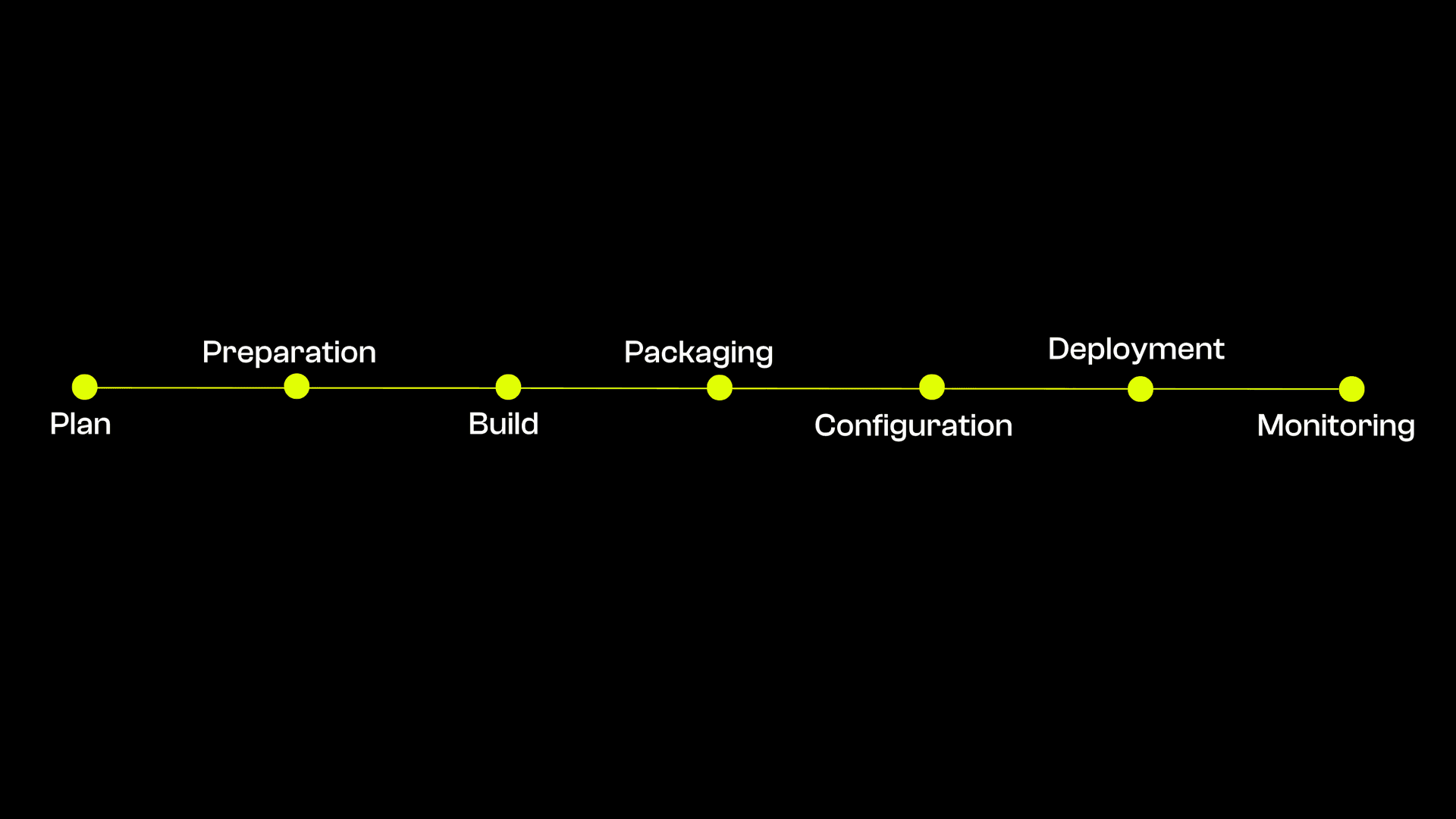
Planning (or simply - plan) is the step that involves a tight collaboration between the development and DevOps team. The most critical planning goals are the assessment of the existing infrastructure and, if necessary, the planning of infrastructure changes for the needs of the new version of the application. In addition to planning, the timing and the method of deployment, the best practice is to deploy during the hours when there are the fewest users online, if possible.
Preparation naturally follows from the planning step. It implies the upgrading of infrastructure based on previous planning. The preparation step most often includes:
- Configuring hardware and software necessary for hosting applications, configuring network infrastructure, etc.
- Configuring environment variables
- Allocating additional resources, if necessary
- Identifying and installing dependent software
Build is the process of converting the source code of the application into an executable form that can be run on the target platform. An executable form represents machine-readable code for the target platform.
Package is the step where we 'package' all the configuration files into a single executable file. In this step, the application with its dependencies and configuration files is combined into a distribution package. (examples could be docker images, jar files, etc.)
Configuration represents the final settings of the environment that are necessary for the packaged application to work as expected for that environment, such as:
- environment parameters settings - refers to environment-dependent parameters, for example, various secrets and server links, ports, etc.
- application parameters settings - this can include parameters such as logging level, setting some security policy, etc.
Deployment is the process of deploying a new version of an application to a target platform, which means running the packaged code on the target platform. The way this is done depends on the deployment strategy, which will be addressed below.
Monitoring is the process of monitoring the performance, availability, and behavior of an application in real-time. The goal of monitoring is to provide insight into the state of the application and identify potential problems or bottlenecks, needed in order to take the appropriate actions to maintain the stable and reliable operation of the application.
Deployment automation process
Imagine that someone has to do all these steps manually, to build the application, set the environment variables, configure the application, then do the deployment, and monitor the behavior of the application for several hours. It could seem that this is not a lot of work. But imagine we have 50 servers where the application is running and that we do the deployment every two weeks. It is indeed hard labor.
In addition to being too much work, manual deployment of applications can be subject to human error, such as misplaced configuration parameters or forgotten steps. Deployment automation reduces the risk of human error because steps are executed according to defined scripts or configuration files. This increases the reliability of the process and stability of the application across multiple deployments.
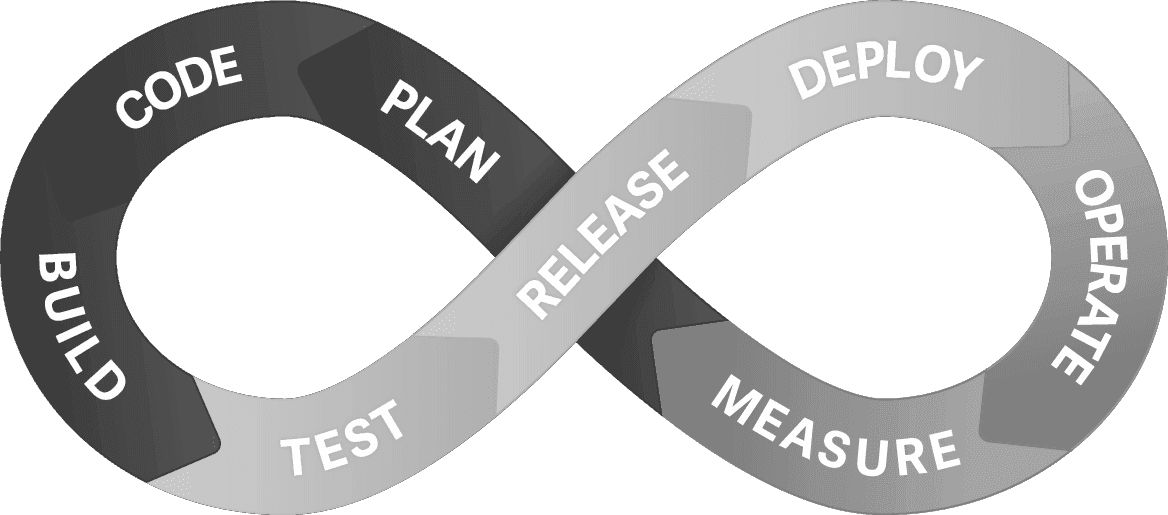
These are some reasons why we should introduce automation into the deployment process. One of the most commonly used deployment automation practices is the CI/CD practice.
What is CI/CD (Continuous Integration/Continuous Deployment)? CI/CD is the practice of software development, which aims to automate testing, code integration, and deployment. CI/CD enables fast and frequent delivery of quality software.
- Continuous Integration is the practice of integrating small code changes into a central repository, to detect problems early in the development process and maintain a stable master code. CI usually involves building the code and performing tests to detect possible errors or conflicts.
- Continuous Deployment refers to the automatic delivery of software to the target platform after a successful CI process. It is sometimes also referred to as Continuous Delivery. When CI is complete and all tests have passed, the CD enables automatic delivery of the application to the target environment. Including automated packaging of the application, the configuration of the target environment, and automatic initiation of the delivery process. The goal of CD is to enable fast and reliable delivery of software into production, reducing the time required for implementation and the risk of manual errors.
As we can see, automating the deployment process is critical in ensuring the efficiency, scalability, and reliability of the software delivery. If you are interested in process automation, hereby a list of several popular tools used for this purpose: GitHub Actions, GitLab CI/CD, Jenkins and there are many more.
Source: https://mia-platform.eu/blog/devops/
Once we have covered and understood the deployment process, and the importance of automation, we can move on to the deployment strategies.
What are deployment strategies?
A deployment strategy defines how we deliver the software. The choice of deployment strategy is very important, as it will directly affect the way we deliver new versions to end users. Depending on the choice, the complexity of the strategy itself also varies. Thus, a trade-off is usually sought between the gain for a given strategy and the complexity of implementation. It is important to note that deployment strategies and their implementation depend on the way how the application is executed on the target platform. For the sake of illustration, I will use a containerized application, which runs in Docker containers.
I would single out the 5 most commonly used deployment strategies:
- Recreate strategy,
- Rolling update,
- Blue-green deployment,
- Canary deployment, and
- A/B testing.
Recreate strategy
The Recreate strategy is simple, and among the first strategies in use as it is a natural way of delivering a new version of software. As the name suggests, deployment is performed by recreating running executables. Simply, this strategy involves shutting down running instances of applications and then turning on new instances with a new version. It is popularly called an 'all or nothing' strategy, as the entire system is recreated.
Advantages:
- Clean start → Replaces the entire previous version and starts the new one, no potential problems when stopping the previous version, or running 2 versions at the same time
- Suitable for small applications due to simplicity → Easy to implement in small applications, where we have, for instance, a single container to stop and start.
- Suitable for significant infrastructure changes → The feature of this strategy to always starting the application from 'scratch', is suitable for huge infrastructure changes, for example: moving from on-premise to a cloud.
Disadvantages:
- Downtime → The biggest problem with this strategy is downtime, which cannot be avoided, therefore, it cannot be used in applications that require high availability.
- Potential data leak → If adequate data synchronization or migration is not ensured, the recreate strategy may result in data loss. It is important to carefully manage the transfer of data between the old and the new system to avoid this risk.
- Complexity → Recreation of the entire system requires careful planning and execution. This approach can be more complex than other deployment strategies that rely on incremental changes and updates.
Rolling update
Rolling Update strategy involves gradually replacing the old version with the new version of the applications. What does this mean? Suppose we have 5 containers running applications, when the deployment starts, the 6th container with the new version is initially started, and when the 6th container is ready for use, one container of the old application is shut down. The process continues until the last container with the old version is replaced.
Advantages:
- No downtime→ Enables updating the system without downtime. Instead of stopping the entire system and updating it all at once, rolling update gradually replaces old instances of software with new versions. That way, users can continue to use the system while the update is taking place.
- High availability → Ensures high system availability during updates. Due to the gradual replacement of instances, at least part of the system is always available to users. This is especially important for critical applications and services that require continuous operation.
Disadvantages:
- Slow process → The process can be quite slow, if we have many instances to replace, and the process takes a long time until an instance is ready to receive traffic This strategy can be very slow.
- Disaster recovery → If an instance is ready to receive traffic, it doesn't always mean that it is working properly. If we notice some issues after launching a new instance, rolling back is just as slow as the initial deployment, unlike some of the other strategies we'll cover.
- Multiple versions running simultaneously → Some applications aren’t designed to have multiple versions running at the same time. For such applications, this deployment strategy cannot be used.
Blue-green deployment
Blue-green deployment is a strategy where the idea is to use two parallel environments, a blue, and a green environment. The blue environment represents the current version, and the green environment represents the new version of the application. This strategy allows us to test a new version of the application before it is pushed to the production environment. When we raise a new, green environment, we give access to the test team that validates and tests the new version of the application. After the tests have passed successfully, we redirect the traffic from the old environment to the new one. The blue environment is kept active until we are sure that the new version, running on the green environment, works as expected.
Advantages:
- No downtime→ Allows us to update the system without downtime, switching the traffic from the old endpoint to the new endpoint representing the green environment is instantaneous.
- Disaster recovery→ Reduces the risk of unexpected problems in the production environment, as it can quickly switch to a blue environment if problems arise.
- Two versions don’t work at the same time→In this case, only one version is available to end users, so we have no restrictions if the application is designed so that it cannot work with multiple versions.
Disadvantages:
- Complex for implementation→ Maintaining and managing two environments (blue and green) can be complex, especially if it is a large system. It requires careful planning and automated tools to deploy, manage traffic, and monitor both environments.
- Large costs → In order to implement a blue green deployment, we need to duplicate resources. This can result in higher infrastructure costs, especially in large and complex applications. We also need more human resources that can maintain and monitor two environments
Canary deployment
Canary deployment is similar to blue-green deployment. As with blue-green deployment, we create a completely new, parallel, environment for the new version of the application. The difference is that with blue-green deployment, the entire traffic is switched to the new environment, while the idea of Canary deployment is to gradually switch a certain percentage of traffic to the new environment, which enables us to monitor the new environment on real users. Canary deployment helps DevOps engineers test the stability of the new version, and also, in case of problems in production, traffic can be returned to the old environment at any moment.
Advantages:
- No downtime→ It allows us to update the system without downtime, traffic distribution between environments doesn’t create interruptions.
- Performance monitoring→ It allows the team to monitor the performance of the new version of the application with real users. Metrics such as response speed, load time, and resource usage can be monitored to ensure that the new version is performing as expected
- Reduce risk → Canary deployment enables the gradual delivery of a new version of the application to a small number of users, thus reducing the risk of potential problems and errors in the application and that a large number of users will be affected by them before they are discovered. If an irregularity in operation is noticed, the damage is minimal.
Disadvantages:
- Complex for implementation→ As with blue-green deployment, maintaining and managing two environments can be complex, specifically in how we're going to separate users between the two environments.
- Large costs → We need to duplicate resources. This can result in higher infrastructure costs, especially in large and complex applications. We also need more human resources that can maintain and monitor two environments.
- Multiple versions running simultaneously → Some applications aren’t designed to have multiple versions running at the same time, for such applications, this deployment strategy cannot be used.
A/B testing
A/B testing is a strategy that is most often used in applications where user experience is most important to us (marketing, ads, sales). The goal of A/B testing is to test two versions of the application on real users and finally decide which version gives better results. A/B testing is implemented by dividing the end users into two groups, group A and group B. Group A has access to the original application, while group B has access to the new version of the application (usually these changes can be implied aesthetic changes, button color changes, images, ad description, etc.). Both groups must be exposed under the same testing conditions (same time period, etc.).
During the testing period, data is collected to measure the performance and differences of the two versions. This data may include clicks, time spent on page, number of purchases, or any other metric relevant to the testing objective. At the end of the testing, the results are analyzed and a decision is made on whether it is benefitial to upgrade to the new version.
Advantages:
- Analysis of user behavior→ A/B testing allows us to monitor the habits of our users, it can bring us useful long-term information in which direction our application should develop.
- Decision based on real users→ A/B testing, if properly configured, can help us make fairly safe decisions for our business, because the decision is based on real usage, unaffected by assumptions and beliefs.
Disadvantages:
- Complex for implementation→ As with the previous two strategies, it requires running the application version in parallel, which leads to many complications.
- Time and costs → A/B testing takes time, and many resources to implement. It is necessary to implement monitoring of two groups of people, to collect metrics that are relevant to the testing case. This can introduce additional work for the teams.
- Large sample of users required→ For A/B testing to provide valid results, a large sample of users is needed on which we test different variants.
How to choose deployment strategies?
Choosing an appropriate deployment strategy depends on many factors and should be based on the specifics of the project, user requirements, and environment constraints. Here are some factors to consider when choosing a deployment strategy:
Project complexity
In some situations, the choice of deployment strategy may also depend on the complexity of the project. If this application is started in one container or one virtual machine, Recreate or Rolling update may be sufficient (with the decision between these two boiling down to whether or not we can have downtime). If the project is complex and susceptible to issues, some more advanced strategies should be considered, such as Blue-Green Deployment or Canary Deployment.
Risks and consequences
Assess possible risks and consequences in case of failure of deployment. If the risk is high and the consequences are serious, it may be safer to use Canary deployment that allows the detection of problems before a full transition. Blue-Green deployment can also be a good decision when it comes to sensitive or mission critical systems.
User experience
How much the deployment of a new version of the application can affect the user experience. If it is important to maintain stability and continuity of user experience, the Canary deployment or A/B testing may be better options as they allow for controlled introduction of changes.
Infrastructure
Consider the availability and capabilities of your technical infrastructure. If you have the ability to maintain parallel environments, a parallel approach may be feasible (Canary deployment, Blue-Green deployment. If resources are limited, you may need to choose a different strategy that suits your environment.
Time and financial possibilities
Consider time and financial factors. Choosing a deployment strategy may depend on available resources and financial constraints. Some strategies, like Rolling update or Recreate may require less time and resources compared to other strategies.
It is important to conduct a detailed analysis of the situation and consult with the relevant stakeholders in order to make the best decision about the deployment strategy for your specific project.
To sum up
Choosing a deployment strategy is very important in the software development process. Before the decision is made, we should think about the needs of the system and our possibilities for implementing a certain strategy. Choosing a good strategy and automating the software delivery process can significantly help us during software development and ultimately increase the satisfaction of the end users. See you on our blog on the next topic.