
Blue/Green deployment is one of the deployment strategies that provides us the solution to deploy new versions of our applications with near-zero downtime and a defined rollback strategy. The general idea is to have in parallel 2 identical environments (blue and green). Blue environment serving current production and green have deployed our new version which is in the background and used for testing. After the testing process is completed you can switch production traffic from a blue to a green environment. In case that any issue occurs during the deployment or after deployment, you can execute rollback by reverting traffic back to the blue environment.
The process involves two identical environments:
- Blue: The active production environment
- Green: The new version is ready for release
Benefits Of Blue-Green Deployment
One of the main issues that all developers have is to ensure safe deployment and minimize downtime on production during deployment. That means that you have a well-tested new version in the same environment as your production.
Blue-Green strategy allows validating a new version in parallel with your production without impacting existing production.
You can completely test the new version in a production-like environment before going live. Switching traffic to the new version is quick and downtime is almost ZERO. The same goes for switching traffic back to the old version in case something goes wrong or discovers unexpected issues. Quick rollback is one of the key benefits of this strategy and you can perform it at any time during the deployment process.
Even more, main advantages of Blue-Green deployment strategy are that:
- Users are not impacted during the deployment process.
- Maintenance or updates can be performed without disrupting the service.
- This ensures you the opportunity for frequent and reliable software updates.
Blue/green deployments also work well with (CI/CD) workflows and also provide cost-optimization benefits. If the performance envelope of the application changes from one version to another, you simply launch the new environment with optimized resources. You also don’t have to run a huge architecture for an extended period. During the deployment, you can scale out the green environment as more traffic gets sent to it and scale the blue environment back in as it receives less traffic. Once the deployment succeeds, you destroy the blue environment and stop paying for the resources it was using.
Implementation of Blue/Green deployment on AWS
Before we start talking about the implementation phases of blue-green deployment on AWS, we will share with you what AWS actually is. Amazon Web Services (AWS) is the world's most comprehensive and widely adopted cloud that provides several tools and services to help you automate your deployments and infrastructure. Some of the most commonly used AWS services for implementation are:
- Amazon Route 53
- Amazon Elastic Load Balancing
- Amazon Elastic Compute Cloud
- AWS Auto Scaling
- AWS CodeDeploy
- Amazon Elastic Container Service
- AWS Lambda Hooks
Now that we are all familiar with the concept of AWS, we can move on to the general stages of the blue-green deployment model.
Since 2025, AWS has introduced native blue/green deployment capabilities in Amazon ECS, simplifying the deployment process without the need for additional tools like CodeDeploy. Lifecycle hooks and support for ‘dark canary’ testing allow safe releases even in complex microservice architectures, enabling controlled testing of a small percentage of traffic before fully switching to the new version.
General stages of a Blue-Green deployment model
The general stages of the blue-green application model are:
- Setup environments: In this stage, you should create identical blue and green environments.
- Deploy updates to green: This phase involves implementing changes in the green environment.
- Testing and validation: At this stage, it is necessary to carry out comprehensive testing of the green environment.
- Verification and quality checks: You should check for performance and compatibility updates.
- Switchover: Redirect production live traffic from blue to the green environment.
- Monitoring (Post-deployment): Continuously monitor green for issues or anomalies.
- Rollback (if needed): Quickly revert to the stable blue environment if issues arise.
- Promote green to blue: Once we are sure that the new environment is stable, make the green environment the new live production (blue).
- Clean up and prepare for the next cycle: Reset and prepare a new green environment for future updates.
Most Commonly Used Implementation Technique for Blue-Green Deployment
Update DNS Routing is one of the most used techniques to implement the Blue-Green strategy. This method is compatible with different environment settings whose endpoint can be represented by a DNS name or an IP address.
Within AWS, this technique applies to environments that are:
- Single instances, with a public or Elastic IP address
- Groups of instances behind an Elastic Load Balancing load balancer, or third-party load balancer
- Instances in an auto-scaling group with an ELB load balancer as the front-end
- Services running on an Amazon Elastic Container Service (Amazon ECS) cluster fronted by an ELB load balancer
- Elastic Beanstalk environment web tiers
- CloudFront with S3 bucket for static websites
- Other configurations that expose an IP or DNS endpoint
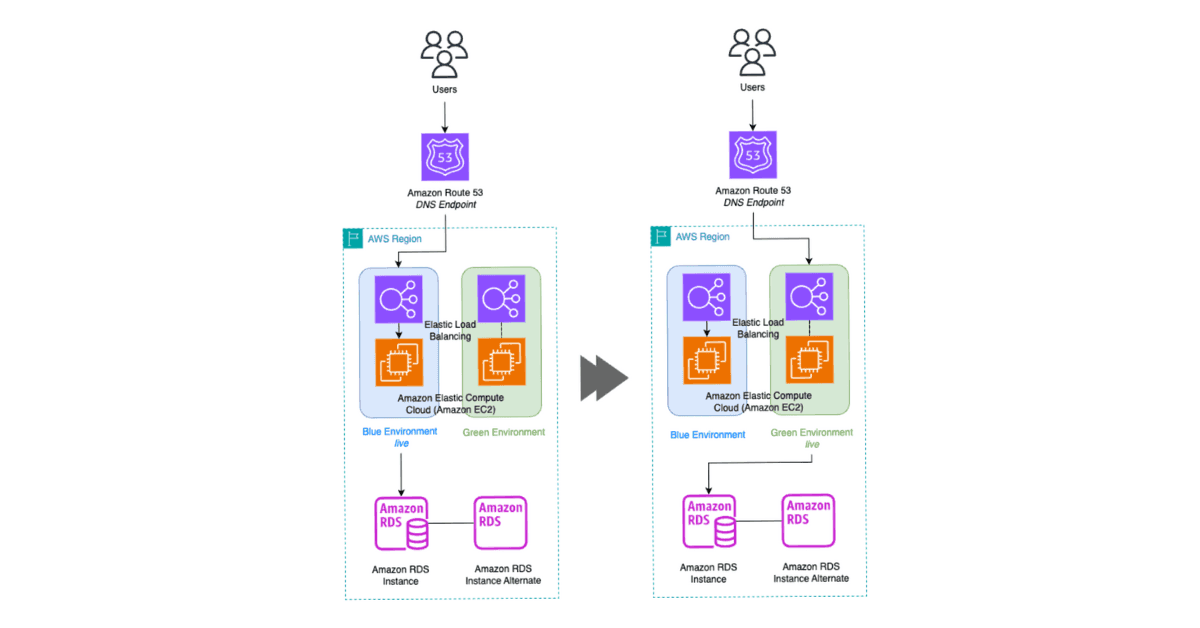
Now we will explain to you how the whole process works. By updating records on DNS, we can route traffic from one environment to another. We can switch all traffic at once, or we can control it by switching a specific percentage (for example 20%) of traffic. This enables us to perform canary analysis. That means we will have a small percentage of traffic introduced to new production, and we can test the new code and monitor for errors. If you’re using Elastic Load Balancing (ELB), he will automatically scale its request-handling capacity to meet the inbound application traffic.
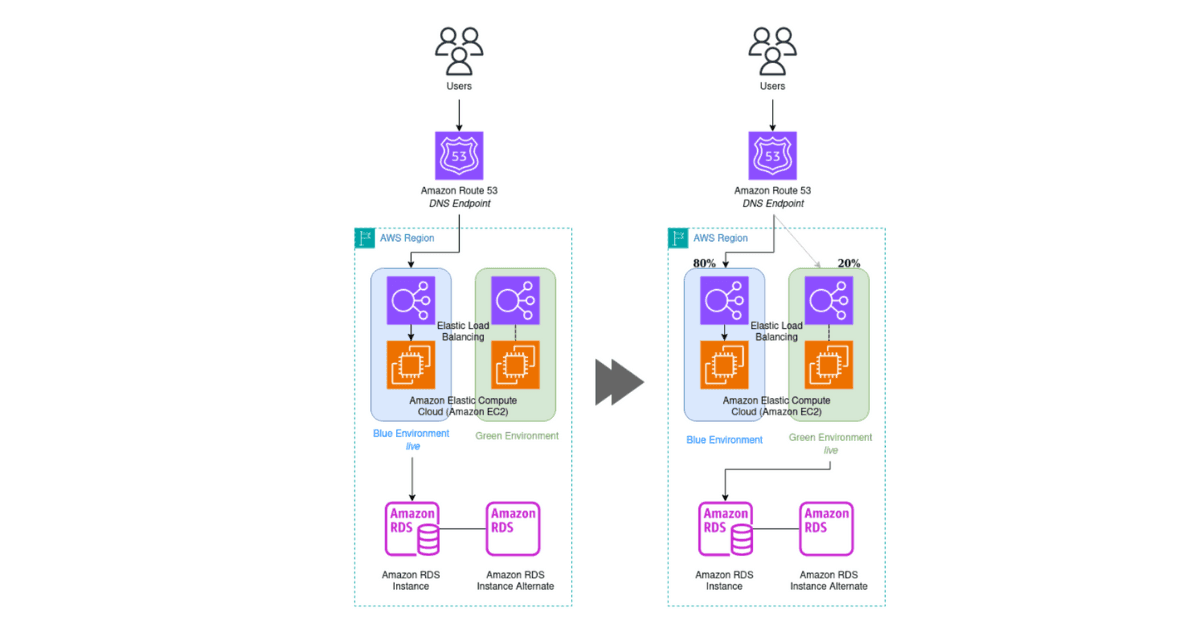
If issues occur after traffic is sifted, you can roll back quickly by updating the DNS record to switch traffic back to the old (blue) environment. You can manage how long after switching you want to have a blue environment in the background in case you need a quick rollback. Time to Live (TTL) determines how long clients cache query results. To reduce and control costs, Auto Scaling configuration is recommended. In that case please note that the new ELB endpoint may need time to scale up as well.
There are several more implementation techniques for the Blue-Green strategy used on AWS. But they are mainly used when we are unable to implement DNS routing because it is too complicated or configurations don’t have to expose an IP or DNS endpoint More information about those alternative techniques, you can find here.
Conclusion
Application deployment has associated risks. However, advancements such as the advent of cloud computing, deployment and automation frameworks, and new deployment techniques, blue/green for example, help mitigate risks, such as human error, process, downtime, and rollback capability. The AWS utility billing model and wide range of automation tools make it much easier for customers to move fast and cost-effectively implement blue/green deployments at scale. If you found this blog informative, I look forward to sharing more insights with you in the next blog post.


