
The value of a solid, flexible cloud infrastructure cannot be underestimated in this fast-evolving digital world. Microsoft Azure, one of the top providers of cloud computing technology has a wide range of services and solutions that can help companies to innovate, scale up, and survive in today's tough market. From small newbies to large conglomerates, you can find what your organization needs on the Azure Cloud platform to change the way it works and take advantage of the cloud. In the continuation of this blog, we will introduce you to the basics of Microsoft Azure.
What is cloud computing?
Cloud computing is the delivery of computing services over the Internet. Computing services include common IT infrastructure such as virtual machines, storage, databases, and networking. Because cloud computing uses the internet to deliver these services, it doesn’t have to be constrained by physical infrastructure the same way that a traditional data center is. That means if you need to increase your IT infrastructure rapidly, you don’t have to wait to build a new data center—you can use the cloud to rapidly expand your IT footprint.
Types of Cloud Services
There are several types of cloud services:
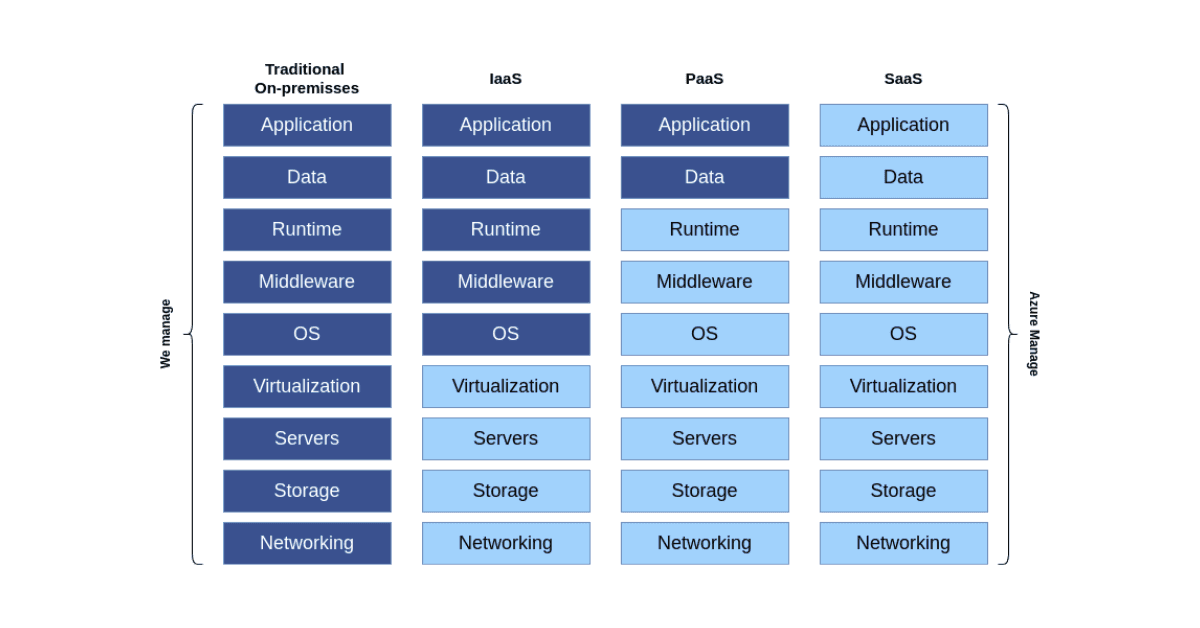
- Infrastructure as a Service (IaaS) is a model that gives computing resources on the web in virtual form. With IaaS, which eliminates investing large sums into hardware, companies buy resources whenever they require or demand them. Examples are Microsoft Azure, Amazon Web Services (AWS), IBM Cloud, Digital Ocean.
- Platform as a Service (PaaS) creates a model allowing developers to use an already-built platform for easy and fast application development. The framework will enable organizations to tailor applications while the enterprise manages servers, storage, and network or a third-party provider. Examples include Microsoft Azure App Services, Azure SQL Database, Azure Functions, etc.
- Software as a Service (SaaS) is a business model of software in which both application software and databases are made available to end-users, while the application vendors manage both the infrastructure and platforms that the services run on. Sometimes referred to as software on demand, SaaS is usually priced under a pay-as-you-go model or a subscription fee. Microsoft 365, Google Workspace, Salesforce, etc. are among the examples that exist here.
Benefits of Cloud Computing
Enterprises are confronted with the obstacles of swift changes and increasing requests for IT resources in the contemporary dynamic business landscape. As we'll discuss in our blog post later, cloud computing offers solutions that are incredibly flexible, fast and agile, scalable, productive, affordable, easy to maintain, and have comprehensive disaster recovery alternatives. This would enable businesses to optimally derive value from their IT investments and remain flexible to changes with these advantages.
- Flexibility: Cloud computing guarantees flexibility in the management of IT resources, as never been seen before; firms can respond quickly to changes in demand and workloads without the physical infrastructure constraints.
- Speed and Agility: Therefore, with cloud services, the quick deployment and scaling of applications worldwide give organizations the capability to respond quickly to opportunities and challenges without delays in provisioning hardware.
- Scalability: Cloud solutions can quickly and efficiently scale resources up and down and guarantee that an enterprise scales up to handle increased workloads or scales back for better resource use with no disruptions to operations.
- Productivity: The cloud, by getting rid of very many tasks—hardware setup and software patching, plus other information technology management headaches—removes human effort from the equation. Now, IT can focus on business value because it's spending far less time on mundane activities.
- Cost-effective: Cloud computing reduces the need for capital investment in servers and hardware, giving out more resources from capital investment, hence reducing IT costs.
- Easy to Manage: All cloud providers offer manageable services with interfaces and tools that are easy to use, which simply make it easy for the business to manage and maintain IT resources without much technical expertise.
- Disaster Recovery: Robust data backup and storage in geographically diverse locations ensure business continuity even under a system failure or disruption.
Azure Resource Hierarchy
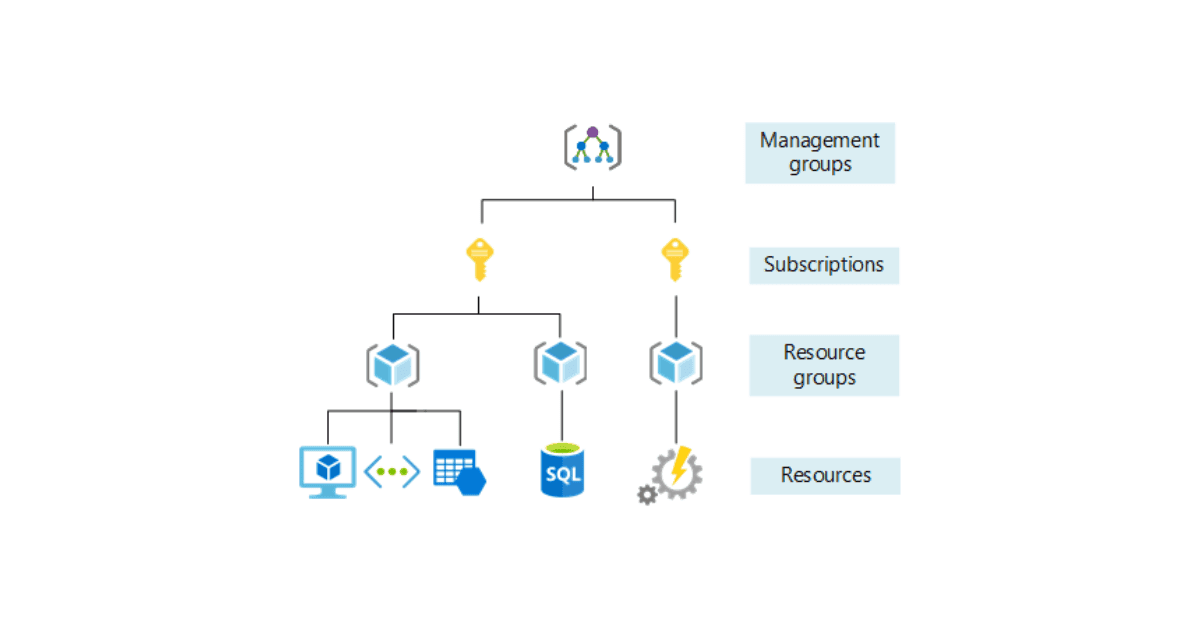
Azure provides four levels of management or four scope levels for organizing Azure resources:
- Management groups help you manage access, policy, and compliance for multiple subscriptions. All subscriptions in a management group automatically inherit the conditions that are applied to the management group.
- Subscriptions logically associate user accounts with the resources that they create. Each subscription has limits or quotas on the amount of resources that it can create and use. Organizations can use subscriptions to manage costs and the resources that are created by users, teams, and projects.
- Resource groups are logical containers where you can deploy and manage Azure resources like virtual machines, web apps, databases, and storage accounts.
- Resources are the actual instances of services you create within a resource group, such as virtual machines, storage, and SQL databases.
Microsoft Entra ID
The most pressing need is to ensure security and compliance on all systems in the dynamic cloud computing environment, by managing identities and access. Microsoft Entra ID, previously branded Azure Active Directory, is an essential service provided by Microsoft for identity and access management. At the enterprise scale, it has a comprehensive solution that can be used to ensure that the safety of applications and resources is maintained at all times.
Microsoft Entra ID is an identity and access management service that helps protect your applications and data at the front gate. It is a universal platform for the management and security of identities so that organizations can manage seamless user access to resources from any location. Microsoft Entra ID offers the ability to centrally set single sign-on (SSO), multi-factor authentication (MFA), and conditional access policies simply and efficiently, ensuring excellent security for your organization's applications and platforms.
Key Features of Microsoft Entra ID:
Single Sign-On (SSO)
Single sign-on with Microsoft Entra ID allows the user to log in only once but gain access to all the needed applications without having to re-authenticate for each of them. This will not only provide more convenience to users, but it will also diminish the chances of password fatigue and other related security risks.
Multi-Factor Authentication (MFA)
When MFA is enabled, it prevents access to resources by just using the correct username and password combination; this feature minimizes unauthorized access.
Conditional Access
Conditional access provides fine-grained security controls depending on the context of the access request. Some policies could be based on user, location, device health, service, or application data. From this, dynamic access decisions that balance security with usability can be made.
Hybrid Identity
Microsoft Entra ID supports hybrid environments that bridge on-premises and cloud-based capabilities, whereby users get a common identity to access both environments. This is especially beneficial for organizations that are moving to the cloud at their pace according to the needs of the business.
Comprehensive Security Reports and Alerts
Advanced reporting capabilities are provided to users within the service. Automated alerts notify administrators about irregular activities and potential security threats so that they can respond promptly.
Azure Core Services
Microsoft Azure offers a comprehensive suite of core services designed to meet the diverse needs of modern enterprises. The services are designed to provide the enabling structure required to create, deploy, and manage applications over Microsoft-managed data centers' worldwide network.
Azure Compute Services
This service provides an individual with resource deployment, management, and scaling with a suite of cloud computing options to enable the application and workloads. These services are based on different needs, ranging from essential development and testing to high-performance computing and even serverless solutions. Below are some of the most significant computer-related Azure services.
Azure Virtual Machines (VMs)
Deploy and manage VMs on-demand, with support for a wide range of computing solutions from simple testing and development environments to high-performance computing applications.
Azure Kubernetes Service (AKS)
An enterprise-grade service that simplifies deploying, managing, and operations in Kubernetes, automatically scaling and upgrades, with integration of other Azure services.
Azure Functions
An event-driven, serverless compute service that enables running code in response to events without explicitly providing infrastructure.
Azure App Services
A fully managed platform to quickly build, deploy, and scale web applications and APIs with powerful capabilities like built-in development operations, continuous integration, and automatic deployments.
Azure Networking Services
The Azure Networking Services offer robust networking features for safe, reliable, and high-performance connections in the cloud and between your on-premises environments. We will detail a few essential services in this category below:
Azure Virtual Network (VNet)
An isolated, private environment in the cloud where you can run most Azure resources, securing communication with your on-premises data centers through different connectivity options.
Azure Load Balancer
High availability and network performance for your applications. It is the first step for any application towards scalability by distributing the incoming network or application traffic across many instances of services defined in a load-balanced set.
Azure VPN Gateway
A VPN solution that connects Azure virtual networks with on-premises networks and, hence, is an ideal solution for hybrid cloud environments.
Azure Database Services
Azure Database Services deliver fully managed, scalable, and secure database solutions for various data needs. From relational databases to globally distributed multi-model databases, these services are designed to handle critical data workloads with integrated intelligence and high availability. Below we will mention some of the most important Azure database services.
Azure SQL Database
A fully managed relational database with auto-scaling, integrated intelligence, and robust security features that support SQL Server workloads.
Azure Cosmos DB
A globally distributed, multi-model database service designed to scale massively to meet your application's performance needs with guaranteed speed at any scale.
Azure Database for MySQL and PostgreSQL
Managed services that offer community edition database engines, ideal for application migration, with built-in high availability and security.
Azure Storage Services
Azure Storage Services offers a really wide range of storage solutions that are incredibly scalable, durable, and secure. Whether you have unstructured or structured data, Azure has you covered. You can choose from Object Storage, File Storage, Messaging, and Block Storage services, ensuring your data management and access needs are met reliably and efficiently for various applications.
Azure Blob Storage
Optimized for storing massive amounts of unstructured data, such as text or binary data, which is highly scalable and accessible from anywhere in the world.
Azure File Storage
Offers fully managed file shares in the cloud that are accessible via the industry-standard Server Message Block (SMB) protocol.
Azure Queue Storage
Provides a messaging store for reliable messaging between application components, whether they are within the cloud, on-premises, or both.
Azure Disk Storage
Provides high-performance, durable block storage designed for use with Azure Virtual Machines and Azure Kubernetes Service.
Azure vs AWS vs GCP
When considering cloud services, it's important to compare Azure with its principal competitors: Amazon Web Services (AWS) and Google Cloud Platform (GCP). Each provider has unique strengths that make it suitable for different business requirements and technical needs.
Below we will list some of the key advantages of Azure Cloud:
- Flexibility in hybrid cloud environments
- Integrated and managed environment for Microsoft services
- Save on running Windows Server and SQL Server in Azure
- Azure has more than 60 regions across the world, more than any other cloud provider
- Unique offerings such as Azure DevOps and Azure IoT Hub
In conclusion, while AWS continues to hold a leading position due to its first-mover advantage and broad service offerings, Azure is catching up rapidly, especially among enterprises embedded within the Microsoft ecosystem.
Conclusion
As we’ve established in this blog, Microsoft Azure has a wide array of comprehensive, powerful services that target different enterprise requirements. Whether it is adaptable networking and scalable computing resources, inclusive database solutions, or secure storage service; Azure provides enterprises with the things they require to succeed in today’s digital-first society. This is integrated into other Microsoft applications so it improves work rate because it provides a single-use interface making it a preferred choice for many enterprises. See you in our next blog with a new topic!


