
An event loop is a programming construct - pattern that allows the program to handle multiple operations or tasks concurrently without the need for multiple threads. The event loop is most often mentioned in pairs with the Javascript programming language and it represents the crucial part of Javascript’s event-driven concurrency model.
Event Loop and Javascript
Javascript is a single-threaded programming language, which implies that it can process only one task at any point in time.
Considering that, one could ask questions like:
- If we have a backend application written in Javascript that needs to process multiple HTTP requests, does that mean that all requests will be processed sequentially, as Javascript can do only one task at a time?
- If we have a frontend application that on initial load needs to fetch some data from some API, will the render of the page be slow as it needs to wait for the API call to finish?
The answer to these and other similar questions is “No”. Runtime Environment for the Javascript leverages an Event Loop among other mechanisms to allow processing of multiple operations seemingly at the same time. Having said that, we can add that Javascript is also asynchronous and non-blocking.
Javascript Runtime Environment
The Javascript Runtime Environment, as the name suggests, is the environment in which the Javascript code executes. It consists of:
- APIs (I/O API, Storage API, Networking API, etc)
- Engine
- Event Loop with the queue(s)
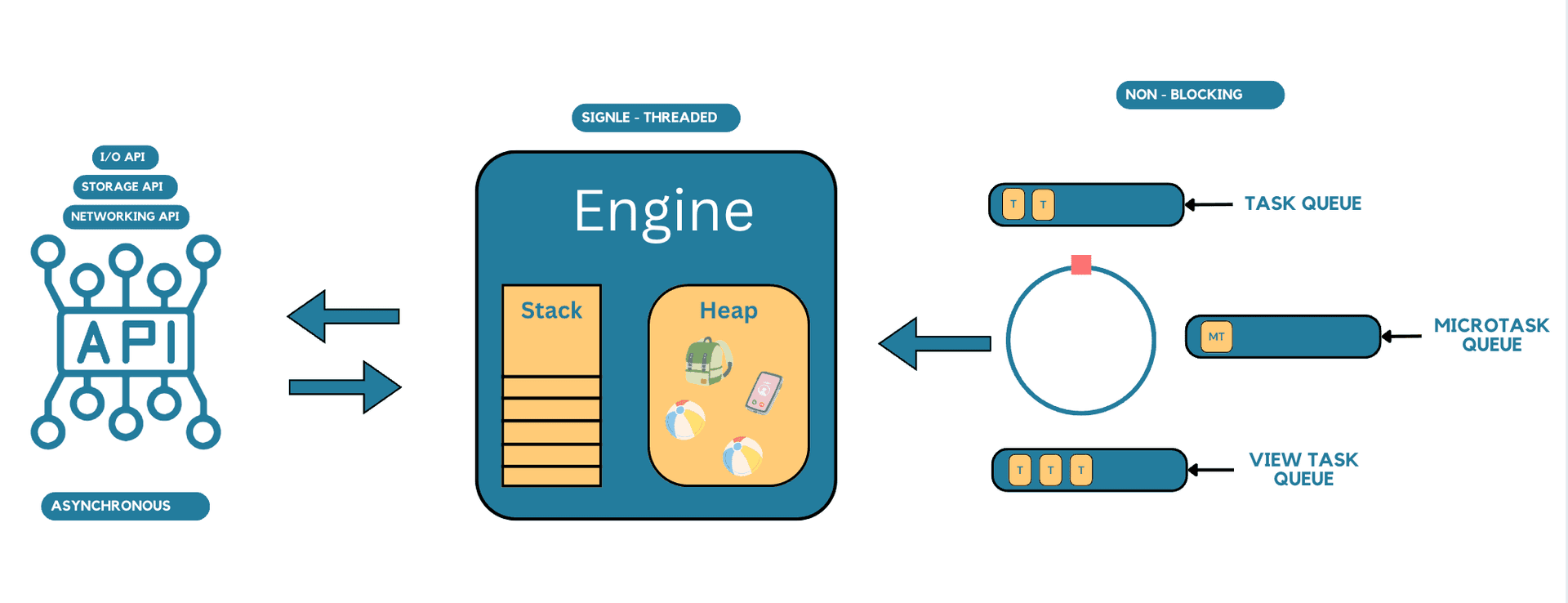
Image: Javascript Runtime Environment Architecture Simplified
The blue circle with the red square represents the Event Loop which takes tasks from the Queues, one by one, and provides them to the Engine that is executing them. The Microtask queue has an advantage over Task and View Task queues.
How Does the Engine Work?
The main part of the Engine, important for understanding the purpose of the Event Loop, is the Call Stack. The Call Stack is used to track the execution of the function(s) inside the task provided by the Event Loop. Whenever a function is called it is added to the Call Stack, and whenever its execution is finished it is removed from the Call Stack. After the function is removed from the Call Stack, the execution of the caller function continues. If there are no more functions on the Call Stack, the Event Loop provides another task for execution.
Hereby an example the execution of a series of functions and how that execution reflects on the Engine.
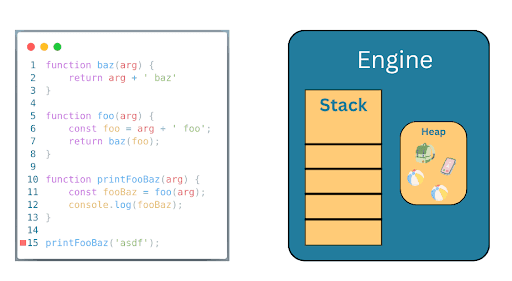
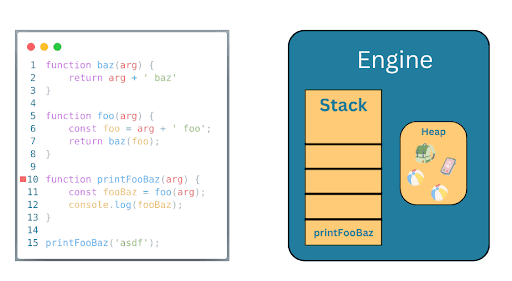
Image: The printFooBaz function is added to the Call Stack and it’s execution starts
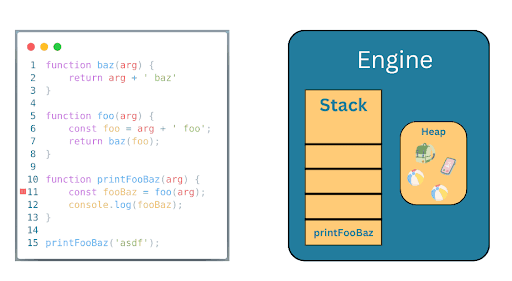
Image: The program continues by calling a foo function
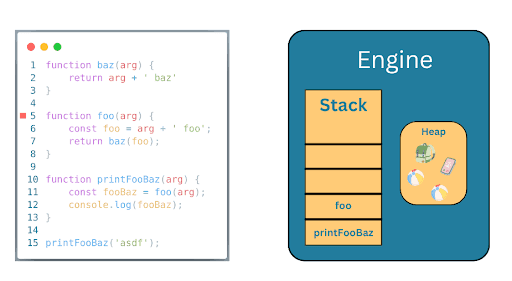
Image: The foo function is added to the Call Stack and it’s execution starts
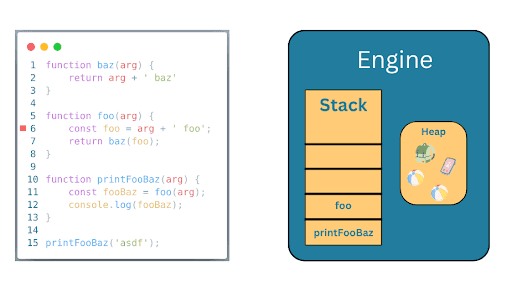
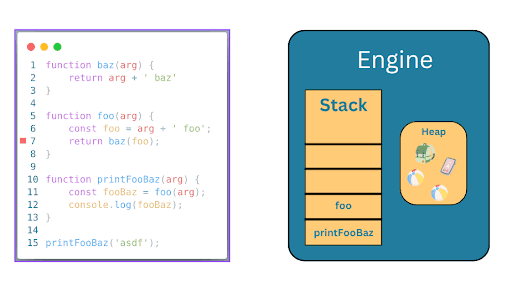
Image: Before the return statement, the program continues by calling a baz function
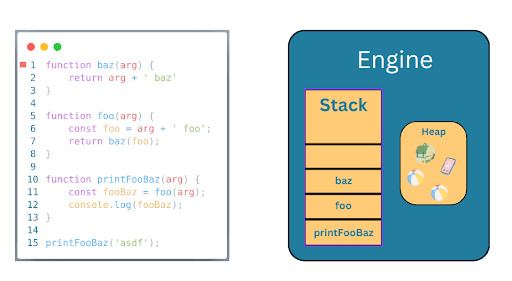
Image: The baz function is added to the Call Stack and it’s execution starts
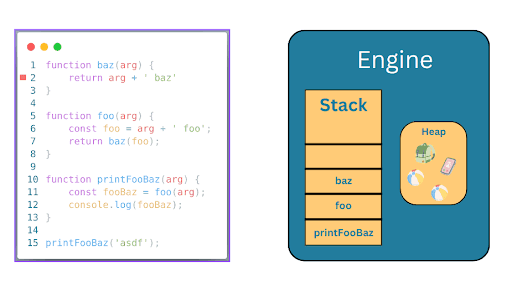
Image: The baz function returns a calculated value and finishes its execution
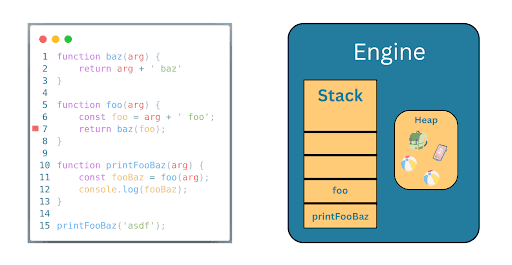
Image: The execution is returned to the foo function and function baz is removed from the Call Stack
Execution goes on and on, until the end of the execution of the printFooBaz function. After the printFooBaz function is executed the Call Stack will be empty, and only then will another task be able to be loaded for the execution.
Why Do We Even Need the Event Loop
As we saw in the example above, the Engine, with the Call Stack and the Heap, is pretty comfortable executing the Javascript code. Considering mentioned, one would ask, why do we even need an Event Loop, Queues, and APIs. Why can’t we just work with the Call Stack and the Heap. The answer is: maybe we could, but then we will have a slow program as without the mentioned components Javascript cannot handle concurrent execution of multiple operations.
To demonstrate the purpose of the Event Loop, Queues and APIs let's analyze one example of fetching text from an API on a simple HTML page using Javascript.
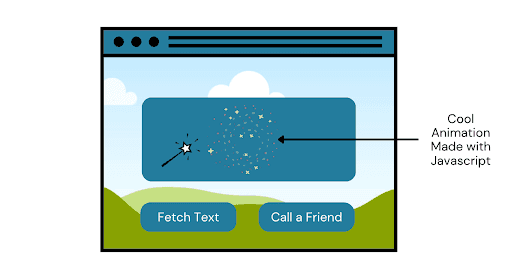
- Fetch Text button
- Call a Friend button
- Extra Cool Animation Made with Javascript representing stars moving in circles.
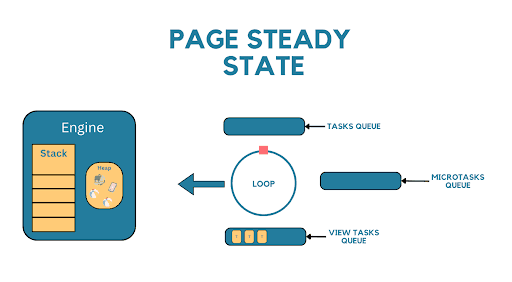
The state of the Runtime Environment after the page is loaded
Now, let’s start interacting with the page by clicking on the Fetch Text button. What happens under the hood?
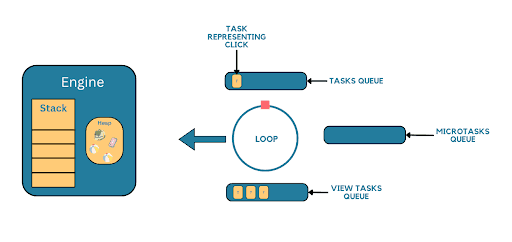
The state of the Runtime Environment after the Fetch Text button is clicked
The new task, representing (containing) a function handleOnClick, appears in the Task Queue which is then taken by the Event Loop and given to the Engine for execution. The Event Loop is stuck and it cannot give new tasks to the Engine before the Engine finishes the execution of the current one. That implies that until the execution of the handleOnClick function ends, the engine will be doing only and exactly that, executing the handleOnClick function.
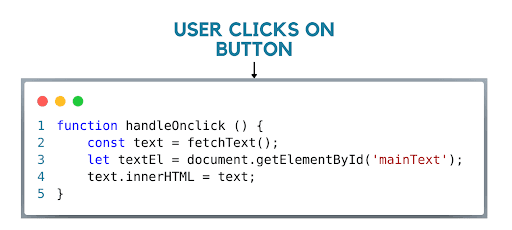
The function code that handles onClick event for the Fetch Text button
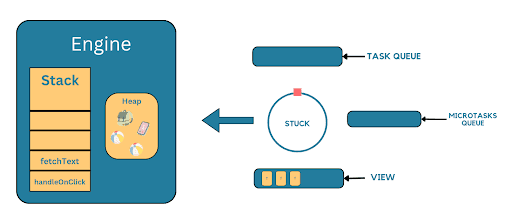
The current state of the Runtime Environment during the fetchText API request:
What happens with the rest of the page? It will be unresponsive. The Engine works on handling the latest task and it cannot process others, like view tasks, therefore cannot re-render UI, nor can it do anything else. This means that our Extra Cool Animation written in Javascript will stop working and also Fetch Text and Call a Friend buttons will become unclickable which will drastically slow the web application and ruin the user experience.
How do we solve this problem? By leveraging the concept of Promise and APIs component of the Runtime Environment.
Promise
Before we get to the solution there is another important mechanism that needs to be understood. Namely, the Promise.
So, what is a Promise object, is it an instance of a Promise class? According to the Mozilla Developer Network (Ref.): “The Promise object represents the eventual completion (or failure) of an asynchronous operation and its resulting value.”
So, it is an object that at the moment of instantiation does not have a value. Its value will either be resolved successfully or will be rejected. In our example of fetching text, we will either get the text for which we sent a request for, or an error.
The promise mechanism is mostly used in situations like we have right now. We want to fetch some data from somewhere, but instead of making the Engine do the work synchronously, we will call a ***fetch ***function, which will return us a Promise and do the fetching asynchronously. After the Promise is either resolved or rejected the callback functions registered with .then(), .catch(), or .finally() are scheduled to run in the microtask queue, where they will be later picked up by the Event Loop and given to the Engine for execution.
Leveraging Promises, APIs, Event Loop and Task Queues for Asynchronous Non-blocking Execution
Let’s return to our solution. Instead of letting the Engine do the fetching of the text and block the execution of other tasks we should assign that task to the Networking API and provide the callback function which will execute after the text is fetched. By doing that, we block the Engine only for the time the job is assigned to the Networking API and after that, the Engine is free and can accept new tasks. The code snippet below shows exactly that:
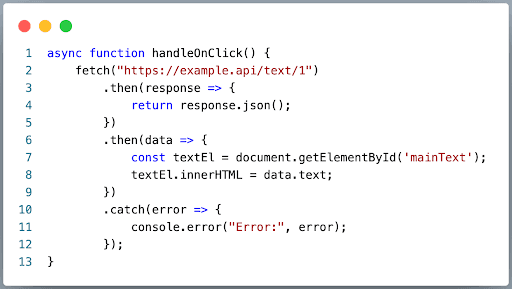
- We call the fetch function which under the hood sends the HTTP GET request using the Networking API of the Runtime.
- The fetch function returns a Promise to which we specify an anonymous function that will execute after the promise is either resolved or rejected - then and catch.
- After the Networking API finishes its job the Runtime will create a new Microtask and add it to the microtask queue, which contains the response and the callback function.
- When the Call Stack becomes empty The Event Loop will take the task and give it to the Engine for execution.
Below are the series of pictures representing the state of the Runtime Environment after the Fetch Text button is clicked.
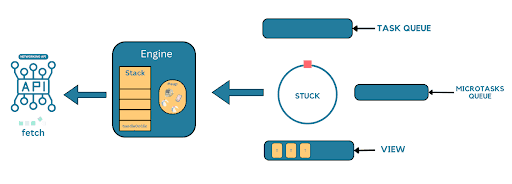
- The Engine executes the fetch function which triggers the Networking API and returns the Promise object
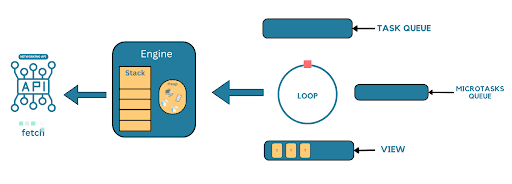
- The Call Stack is empty and the Event Loop can provide new tasks for the Engine to execute
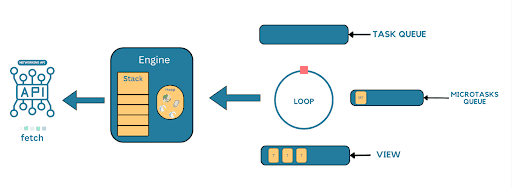
- The Networking API finished it’s job and the Runtime Environment scheduled a new Microtask
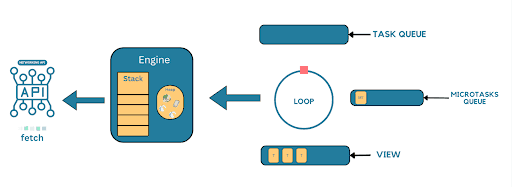
- The Microtask gets picked up by the Event Loop and gives its callback to the Engine for execution
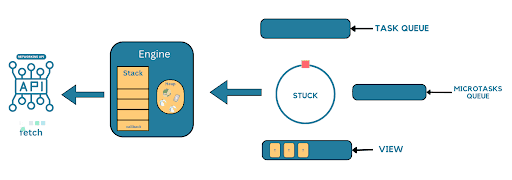
With this asynchronous approach, we do not wait for the Engine to do the API call, instead, we delegate that job to the Networking API by calling the fetch function which also returns the promise. By doing that, we relieve the Engine and enable it to do other tasks like render the page, etc. After the promise either resolves or rejects, we can continue to execute our logic which happens after the API call in then and catch functions.
Conclusion
When I first started learning Javascript and found out that it is a single-threaded language, I couldn't understand how it can be used to build responsive web applications with so many things happening at the same time. The answer to my question was The Event Loop, along with APIs and Queues and their cooperation and coordination orchestrated by the Javascript Runtime Environment which I hope you understand now. See you in the next blog post with a new topic!


